Most agent frameworks hide the control flow behind a single run call. LangGraph does the opposite: it makes the control flow the thing you actually design, as an explicit graph you can inspect, pause, and resume. The diagram below shows the shape of a typical graph.
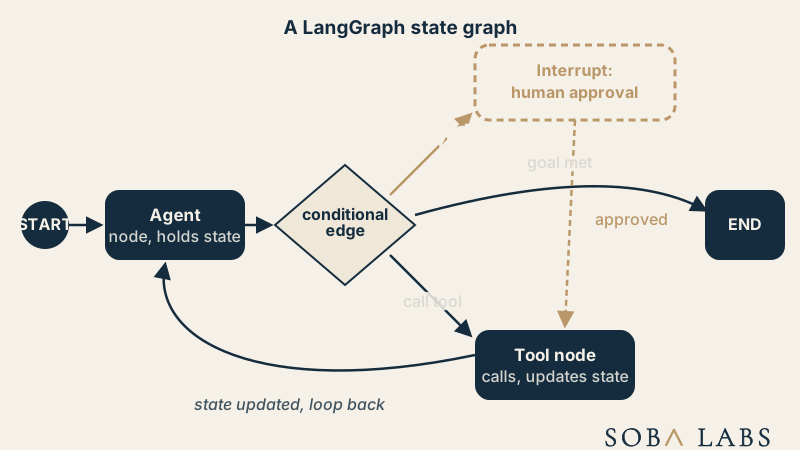
A chain runs top to bottom once. A LangGraph graph can loop, branch, and pause for a person, because the control flow is data, not just code.
What are nodes, edges, and state in a LangGraph graph?
A node is a single step, usually a call to the model or a tool; an edge routes execution from one node to the next, and can be conditional, deciding the next node based on what the current state actually contains rather than following a fixed path. State is the object every node reads and updates, so the graph always knows where a run actually is, which is what lets LangChain’s components stay stateless while the graph carries state on their behalf.
Why does a graph need cycles at all?
Because an AI agent rarely finishes in one pass. A straight line handles a fixed pipeline; a cycle is what lets an agent call a tool, look at the result, and decide to call another tool or the same one again, the loop that turns a chain into something that actually behaves like an agent rather than a script.
How does a human-approval interrupt actually work inside the graph?
An interrupt pauses the graph at a named node and hands control back to the calling code, exactly the mechanism behind a human in the loop gate: the graph’s state is checkpointed, a person reviews or edits it, and execution resumes from that exact point rather than restarting. This is what makes LangGraph a common choice for agents that touch anything genuinely risky, since the pause is a first-class part of the graph, not a workaround bolted on afterward.
When does a team actually need LangGraph instead of plain LangChain?
Not for a single retrieval call or one tool invocation, LangChain’s components handle that directly. LangGraph earns its complexity once a workflow needs branching decisions, a loop that runs an unknown number of times, or multiple agents coordinating, the kind of structure covered under multi-agent systems. Every run traced through LangSmith shows exactly which node ran, which edge fired, and where an interrupt paused, turning a graph that would otherwise be hard to debug into one a team can actually reason about. That level of control is why the stack sits under most of what we ship as LangChain Ambassadors.